
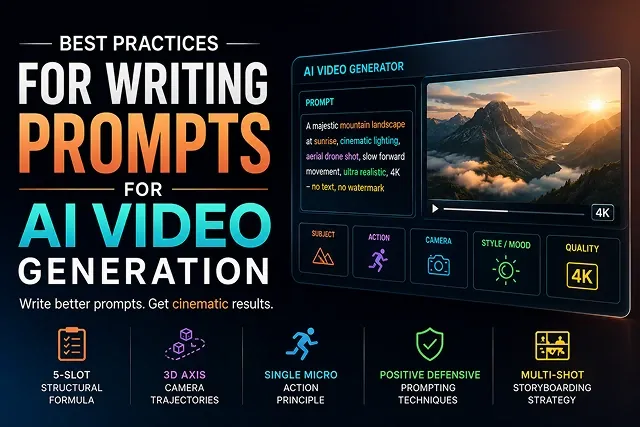
Prompt engineering for AI video generation has moved past standard image-prompting techniques. Because video introduces the element of time—requiring models to compute physics, lighting shifts, and camera arcs across sequential frames—treating video models like simple text-to-image generators often results in visual drift, morphing limbs, and wasted credits.
Modern diffusion transformer (DiT) models (such as Sora 2, Google Veo 3.1, Kling 3.0, and Wan 2.2) require structured, directable text specifications.
Here is the comprehensive guide to the best practices for writing AI video prompts, designed to deliver predictable, studio-grade outputs on your first render pass.
Above-the-Fold Feature Matrix: Basic Prompts vs. Masterclass Cinematic Prompts
Prompt Engineering Framework · High Failure Rate vs. Predictable Motion
| Prompt Element | Basic Prompting (High Failure Rate) | Masterclass Cinematic Prompting (Predictable Motion) |
|---|---|---|
| Subject Definition | Broad terms ("A man standing") | Anchored features ("A 30-year-old astronaut in a weathered white suit") |
| Motion Description | Vague action ("Running fast") | Explicit velocity & physics ("Dashing through a rain-slicked neon street, water splashing") |
| Camera Control | No camera guidance ("Cinematic look") | Specific director vectors ("Low-angle tracking dolly shot, 35mm anamorphic lens") |
| Lighting & Mood | Generic adjectives ("Beautiful lighting") | Volumetric & atmospheric cues ("Harsh golden-hour rim lighting with volumetric fog") |
| Style Guidance | Contradictory tags ("3D Pixar render, realistic photo") | Unified style anchor ("Photorealistic 1990s 35mm film stock, natural grain") |
1. The Core 5-Slot Prompt Structure
To prevent the video engine's attention layers from blending scene elements together, format text prompts using a consistent, logical hierarchy:
Video Prompt = Subject + Environment + Action + Cinematography + Lighting & Atmosphere
- [Subject]: A cybernetic mechanic with grease-stained hands...
- [Environment]: ...inside a dim, clutter-filled high-tech repair bay...
- [Action]: ...adjusting a glowing circuit board with precision tools...
- [Cinematography]: ...close-up shot, 85mm prime, slow dolly push-in along the Z axis...
- [Lighting and Mood]: ...chiaroscuro lighting, golden hour rim light, volumetric dust.
Why Order Matters:
- Subject & Environment First: Models allocate the highest computational weights to the first few tokens in a prompt. Establishing subject geometry and spatial bounds early prevents character drift.
- Separating Action from Camera: Clearly distinguish between subject motion ("character walking") and camera motion ("camera dolly tracking"). Mixing these forces the AI to guess whether the person or the camera is moving.
2. Controlling Camera Trajectories with 3D Axis Vectors
Undirected prompts cause models to default to chaotic zooming or random panning. Direct camera paths explicitly using standard 3D spatial directions:
- Dolly Push-In (Z-Axis): "Perform a slow dolly-in along the negative Z-axis while your focus is centered on the subjects’ eyes."
- Trucking / Tracking (X-Axis): "The smooth horizontal truck movement takes place right along the X-axis, keeping the 3D backgrounds in mind."
- Pedestal / Crane (Y-Axis): "A vertical pedestal shot moving straight up along the Y-axis, transitioning from the ground to the eye level point."
- Orbital Pan: "Low angle of 360-degree orbit pan around the still subject."
3. The "Single Micro-Action" Principle
Attempting to fit complicated multi-part plots into a single prompt violates the laws of physical geometry:
❌ "A man stands up, opens the door of a car, sits inside and drives away." (Causes melting limbs, oversupply of hands, and physics violations).
Solution: Multi-shot Storyboarding
Divide complex actions into series of separate 3-5 second micro-prompts:
1. Introduce Initial Action
- Prompt: "Medium close shot showing a man jumping up from an armchair, staring at the glass door, expression tense, the camera still."
2. Change Environmental Angle
- Prompt: "Close up shot, boots landing firmly on asphalt, camera mounted low."
3. Make Final Move
- Prompt: "Wide shot of a vintage car driving down the empty highway; the camera shoots in parallel."
Using Optical Language Instead of Generic Style Tags
Cinematic Term Replacement · Fluff Words vs. Professional Optical Equivalents
| Fluff Word ❌ | Professional Optical Equivalent ✅ | Visual Result |
|---|---|---|
| "Hyperrealistic close up" |
"85mm prime lens, f/1.4 aperture, shallow depth of field, creamy background bokeh"
|
Isolates the subject while naturally blurring background noise. |
| "Cool cinematic drone view" |
"24mm wide-angle, aerial crane shot ascending along the positive Y-axis"
|
Executes an expansive, stable environmental reveal. |
| "Very dramatic lighting" |
"Low-key lighting, 3200K key light from camera-left, deep shadow contrast"
|
Sets explicit color temperature and key light placement. |
| "High quality motion" |
"24 FPS frame rate, 180-degree shutter angle, subtle natural motion blur"
|
Prevents robotic, hyper-smooth "soap opera effect" motion. |
Request A Custom AI Video
Tell us what you're trying to create and we'll point you to the right tool — or help you set it up.
4. Defensive Prompting & Quality Anchors
To prevent common neural artifacts (like waxy skin textures, extra fingers, or flashing lights), include positive defensive quality anchors directly inside your prompt:
Universal Positive Defensive Block:
- "Tack-sharp focus throughout, anatomically accurate joint motion, stable 3D geometry, consistent lighting ratios, fluid physical movement, 35mm film stock master."
5. Model-Specific Syntax Dialects
Different AI video models respond best to specific prompt styles based on their training datasets:
- OpenAI Sora 2: Excels at natural language narrative descriptions and physical world simulations. Write detailed, descriptive prose paragraphs rather than keyword lists.
- Google Veo 3.1: Strong understanding of cinematic optics, camera framing, and audio-native cues. Use explicit focal length specifications (85mm), spatial sound cues, and lighting Kelvin temperatures.
- Kling 3.0 and Wan 2.2: excel at I2V character retention, anime styles and following prompts. Best to keep prompts short and structured, focus on micro movement vectors.
6. High-Precision Multi-Shot Prompt Scripting
When creating prompts for a narrative with multiple viewpoint characters, arrange your text such as multiple short video frames instead of just flowing paragraphs together.
- [General Style Reference]: Classical 35mm anomorphic film, dim lights, 24 frames per second, natural color grading.
- [Scene 1 - Setting the story - 4s]: 24mm wide lens footage. It shows a deserted alley in Tokyo during pouring rain. Neon lights gleaming on the trail of wet asphalt, and some cups of steam rising from the vents on streets. Camera is moving precisely towards right direction.
- [Scene 2 - Personality - 3s]: Medium close-up with 85mm lens. The camera depicts a tired detective wearing a tan coat, which has appeared in the frame.
- [Shot 3 - Micro-Action - 3s]: Macro rack focus shot from rain drops sliding down a glass window pane to the detective's eyes reflecting neon light in the background.
AI Video Prompt Engineering FAQs
Master structured blueprints, camera directives, temporal anchors, and artifact-free generation techniques.
Follow the Six-Layer Blueprint: [Subject] + [Action/Motion] + [Camera Trajectory/Optics] + [Lighting & Color] + [Environment/Setting] + [Aesthetic/Style Specs]. Structuring variables in this sequence allows the AI model's spatial attention layers to process the primary subjects and actions before applying environmental lighting and post-processing aesthetics.
Replace generic terms like "cool shot" or "move closer" with specific camera directives. Use optical terms such as "slow tracking dolly-in," "low-angle arc shot," "FPV drone pan," or "35mm lens with shallow depth of field." Specifying real-world camera optics guides the model's motion vectors to simulate natural physical camera moves.
Unlike static image generators, modern video diffusion transformers often struggle with negative prompt logic, occasionally generating the exact elements you intended to exclude. Instead of negative statements like "no blur, no distortion," phrase instructions positively (e.g., "tack-sharp focus throughout frame, clean edge fidelity, steady motion tracking").
Use an Image-to-Video baseline workflow rather than relying solely on text. Generate a high-resolution keyframe portrait first, then pass that image into your video generator as a reference target. Additionally, use Token Inheritance by copying core character descriptors (such as hair style, clothing details, and unique facial features) verbatim across all scene prompts.
The optimal prompt length for modern video transformers is 60 to 120 words. Extremely short prompts (under 20 words) force the engine to make random visual assumptions, while overly long prompts (over 200 words) can lead to prompt bleeding or cause the model to ignore lower-priority directives.
Specify the light source direction, color temperature, and atmospheric quality explicitly. Instead of writing "bright lighting," try: "Warm golden hour backlighting, 3200K warm tone, volumetric dust particles visible in air, soft lens flare, high contrast shadows."
Motion stretching happens when you request excessive movement speed in a short clip window. To prevent visual artifacts, keep your motion intensity slider set to a moderate range (3 to 5 out of 10) and describe gentle, continuous actions (e.g., "subject turns head slowly toward camera") rather than complex, rapid movements.
In Text-to-Video, your prompt must describe both the static elements (subject, environment, lighting) and the movement. In Image-to-Video, the base image already provides the visual subjects and environment, so your prompt should focus primarily on describing camera motion trajectories, environmental physics, and subtle character actions.
Use Temporal Pacing Anchors in your text string. Modern video models parse sequential prompts effectively when formatted like: "First 2 seconds: character looks out window silently. Next 3 seconds: character turns slowly toward camera and smiles." This structure helps the diffusion model plan scene motion across frames cleanly.
Adhere to this 3-Step Prompt Engineering Pipeline: First, run rapid 480p low-resolution draft generations to test prompt structure, camera movement, and temporal timing. Second, refine descriptors and adjust motion strength sliders to eliminate any visual artifacts. Finally, lock your prompt parameters and render the final clip at full resolution before passing it through an AI video upscaler for a 4K finish.
Ready to try Skora AI?
Transform your ideas into cinematic video in seconds.