
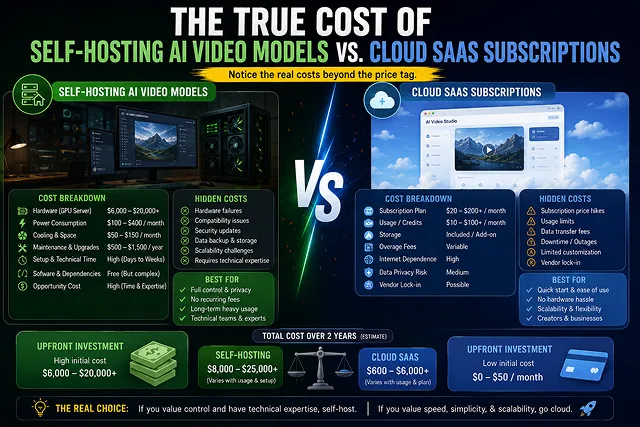
To use AI video production at scale, content creators and developers must make a critical choice: to go with managed Cloud SaaS Subscriptions (for example, Runway, Kling AI, Luma, and Sora), or to implement self-hosted open-weight pipelines (like Wan 2.2/2.7 or LTX Video running on private GPUs or cloud instances such as RunPod and Vast.ai)..
While commercial SaaS offers effortless access via the browser, the costs of high-volume generation can escalate quickly. Self-hosting, on the other hand, dramatically reduces variable costs but incurs hardware depreciation, power costs, and DevOps difficulties.
Above-the-Fold Breakdown: Self-Hosting vs. Cloud SaaS Total Cost of Ownership
Infrastructure & Cost Analysis · On-Premise GPU Rigs vs. Serverless vs. Managed AI SaaS
| Financial & Operational Dimension | Self-Hosted On-Premise GPU Rig | Bare-Metal Cloud Serverless (RunPod / Lambda) | Managed Cloud SaaS (Web Studios) |
|---|---|---|---|
| Upfront Hardware Investment | $4,000 – $25,000+ (Workstations, high-VRAM GPUs) | $0.00 (Pay-as-you-go GPU instance billing) | $0.00 (Turnkey browser access) |
| Ongoing Monthly Base Cost | Electricity, cooling, & replacement parts ($150–$400/mo) | Hourly compute rate ($1.50–$3.50/hr per GPU) | $10 – $50/mo subscription |
| VRAM & Memory Requirements | Minimum 24GB – 80GB VRAM per node (RTX 4090 / A100 / H100) | Handled dynamically via cloud container clusters | Zero local VRAM needed (Runs on remote servers) |
| Engineering & DevOps Overhead | High (CUDA drivers, ComfyUI nodes, quantizations) | Medium (Docker containers, serverless cold starts) | Zero (UI/UX managed 1-click generation) |
| Render Concurrency & Scaling | Strictly limited to physical GPU count | Scales via container instances with latency overhead | Massive parallel rendering |
| Model Updates & Enhancements | Manual checkpoint downloads & LoRA re-tuning | Manual script containerization | Automated rolling model upgrades |
1. The Math Behind the Breakeven Tipping Point
To determine when self-hosting becomes cheaper than a cloud subscription, calculate your Monthly Generation Volume (V):
- Monthly SaaS Cost = Base Subscription + (Additional Credit Packs x Volume)
- Cloud GPU Cost = (Inference Render Time in Hours x GPU Hourly Rate) + Persistent Storage Volume
Cost ($)
 ▲
 │                                         / [Cloud SaaS Scaling Curve]
 │                                        /
 │                                       / ◄── Tipping Point (~80–120 Videos/Month)
 │                                      /
 ├─────────────────────────────────────/─────────────────── [Self-Hosted Cloud GPU (Flat Rate)]
 │
 └────────────────────────────────────────────────────────► Monthly Video Output
- Small Volume (50 Clips/Month): Go with Cloud SaaS. At small quantities, a $20-$35/month Cloud SaaS account will be significantly less expensive and faster to get started than setting up a local ComfyUI setup with GPU debugging of CUDA drivers.
- Moderate to High Volume (80-300+ Clips/Month): Switch to Cloud GPU Instances (RunPod / Vast.ai). Using an open weights model, like Wan 2.2 on an NVIDIA L40S or RTX 4090 instance costing ~$.045-$.070 per hour, enables a decrease in cost per clip generation of as much as 75%.
- Enterprise High Volume (500+ Clips/Month): Buy Dedicated Local Hardware. A local workstation equipped with an NVIDIA RTX 4090 (24GB VRAM) achieves full financial return on investment within 4-6 months of consistent video rendering.
2. Hidden Costs Creators Frequently Overlook
1. Hidden Costs of Cloud SaaS:
- The "Failed Render Tax": AI video models rarely succeed on prompt 1. A standard 5-second scene that can be used calls for around 3 to 4 tries, resulting in the depletion of your monthly credits at 3 times the normal rate.
- Resolution & Feature Multipliers: When rendering in native 4K or producing synchronized multi-track audio, commercial platforms very often impose an additional credit charge of anything between 3 and 5 times.
2. The Secret Costs of Self-Hosting:
- Idle Compute Drain: Forgetting to terminate an on-demand cloud GPU instance (e.g., leaving a $0.70/hr pod active overnight) leads to wasted compute bills.
- Persistent Storage Fees: Storing large model weights (20GB-40GB per DiT checkpoint) on network volumes costs $3-$7/month per volume regardless of compute usage.
- Cold Starts & Queue Latency: Serverless GPU setups that scale to zero to save costs introduce a 45-to-90 second "cold start" delay while loading model weights into VRAM.
Cost Comparison: Self-Hosting vs. Cloud SaaS
Economic & Infrastructure Breakdown · Managed Platforms vs. Cloud Compute vs. On-Prem Hardware
| Operational Vector | Commercial Cloud SaaS (Runway / Kling / Luma) | Cloud GPU Instance (RunPod / Vast.ai Serverless) | Dedicated On-Premises Hardware (NVIDIA RTX 4090 / Pro) |
|---|---|---|---|
| Upfront Capital Expense (CapEx) | $0 (Zero initial hardware investment). | $0 (Pay-as-you-go cloud compute). | $2,200 – $4,500+ (High-end GPU & cooling rig). |
| Monthly Operating Expense (OpEx) | $12 to $95/month (Hard-capped credit limits). | $25 to $60/month (Active compute + storage volumes). | $15 to $40/month (Residential electricity & cooling). |
| Cost per 5-Second Video Render | $0.25 to $1.20 (Including retry passes). | $0.03 to $0.08 (On-demand GPU compute). | <$0.01 (Marginal electricity cost). |
| Character & Structural Control | Limited to platform UI sliders and stock modes. | Infinite (ComfyUI nodes, ControlNet, IP-Adapter). | Infinite (Custom fine-tunes, LoRA training). |
| Technical Maintenance / DevOps | Zero (Fully managed infrastructure). | Moderate (Docker, CUDA drivers, API webhooks). | High (Hardware cooling, thermal throttling, updates). |
Request A Custom AI Video
Tell us what you're trying to create and we'll point you to the right tool — or help you set it up.
3. The 3-Phase Infrastructure Roadmap
Phase 1: SaaS Creative Prototyping
- Start on commercial cloud subscriptions (e.g., Kling Pro or Runway Standard). Focus on mastering camera motion syntax, testing prompt styles, and proving that your content converts before investing in engineering.
Phase 2: Hybrid Cloud GPU Offloading
- Once monthly generation exceeds 100 clips, deploy an open-weights model (such as Wan 2.2) on a serverless GPU cloud platform (RunPod or Vast.ai). Route repetitive background B-roll rendering to your private GPU pod while keeping hero avatar shots on SaaS.
Phase 3: Completely Autonomous On-prem Rig
- For most studios and high-volume media providers outputting 500+ videos per month, you’ll want to buy locally available GPU machines with NVIDIA RTX 4090/5090 24GB + VRAM. Run local ComfyUI headless batch workflows for near-zero marginal rendering costs.
4. Low-Level Kernel Acceleration and VRAM Footprint Engineering
To avoid getting OOM when running models that have a total of 14B to 22B parameters, such as Wan 2.2, HunyuanVideo 1.5 or LTX-Video 2.3 with Diffusion Transformers:
[Raw DiT Weights (BF16 ~28GB)] ➔ [FP8 Block Quantization (e4m3fn ~14GB)] ➔ [FlashAttention-3 / SageAttention]
                                                                                               │
                                                                                               ▼
[4K Master Output Canvas] ◄─── [Tiled Spatial VAE Decoder] ◄─── [Ring-Attention Temporal Layers] ──────┘
1. FlashAttention-3 & SageAttention Integration
Standard PyTorch scaled dot-product attention scales quadratically (O(N^2)) with token length, causing VRAM spikes during high-resolution 3D spatio-temporal video patching.
- FlashAttention-3 / SageAttention: Re-orders memory reads/writes to GPU SRAM, slashing temporal attention memory overhead by 45%–60% and boosting inference speed by 1.8x.
- TeaCache Dynamic Acceleration: Skips redundant transformer layer computations across sequential frames with minimal motion, cutting render time by an additional 25%–35% without perceptual degradation.
2. FP8 vs. INT4 Quantization Trade-offs
- FP8 (e4m3fn format): Preserves visual dynamic range, skin texture, and fine hair detail while halving model memory weight (14GB footprint for Wan 2.2 14B).
- INT4 / GGUF (Q4_K_M): Enables running 14B models on consumer cards (8GB–12GB VRAM). However, INT4 quantization introduces subtle high-frequency "checkerboard" artifacts and temporal motion shimmering in dense backgrounds.
4. Thermal Throttling of Hardware and Electricity Expenses
For determining the cost of on-site GPU system (like devices working with two RTX 4090 and RTX 5090), consider electricity and thermal elements:
- Prolonged Electrical Consumption: Continuous diffusion sampling of NVIDIA RTX 4090 consumes around 420W - 450W. Including the CPU, cooler, and motherboard consumption results in total power consumption of 0.65 kWh.
- Monthly Power Cost: If you're operating an on-prem rig 10 hours per day at $0.16/kWh.
Monthly Power = 10 hours x 30 days x 0.65 kW x $0.16 = $31.20/month.
- Thermal Throttling Protection: When GPU core temperatures exceed 83°C (or memory junction temperatures exceed 95°C), the GPU automatically throttles clock speeds by 15%–30%, increasing render times. Maintain high-airflow chassis spacing and set power limits to 85%–90% via nvidia-smi -pl (watts) to stabilize thermal efficiency.
Self-Hosting vs Cloud SaaS: True Cost Matrix
Compare GPU hardware capital, credit economies, electricity costs, DevOps overhead, and break-even thresholds.
It is the difference between CapEx (Capital Expenditure) vs. OpEx (Operational Expenditure). Cloud SaaS platforms charge a monthly subscription or pay-per-credit fee ($15–$95+/month) with zero setup required. Self-hosting requires purchasing expensive local GPU hardware upfront ($1,500–$4,000+) or renting hourly cloud instances (RunPod/Lambda at $0.50–$2.50/hr), offering near-zero marginal cost per video once operational.
Modern open-source video models (such as Wan 2.2 or CogVideoX) require high VRAM. The baseline entry point is an NVIDIA RTX GPU with at least 16GB VRAM (e.g., RTX 4080 / 4070 Ti Super) costing ~$800–$1,200, while comfortable 720p/1080p generation demands an RTX 4090 (24GB VRAM) or professional A6000 Ada, pushing full workstation build costs to $2,500–$5,000+.
Renting cloud GPUs on platforms like RunPod or Vast.ai costs roughly $0.40–$0.80 per hour for an RTX 4090 and $1.80–$2.50 per hour for an enterprise A100/H100. If you generate 200 video clips in a focused 5-hour batch session on a rented 4090 pod, your compute bill is under $4.00, compared to spending $50–$100 in SaaS platform credit top-ups.
The break-even point typically occurs around 150 to 250 video generations per month. If you only create 20 to 50 short clips monthly, a $20–$30/month SaaS subscription is far more economical. However, if you run automated faceless channels or marketing split-tests rendering 500+ clips monthly, local self-hosting or serverless GPU pipelines pay for their hardware costs in under 4 to 6 months.
Self-hosting carries three major hidden costs: 1. Electricity & Thermal Cooling (an RTX 4090 running 24/7 at 450W consumes noticeable household/studio power), 2. Fast NVMe Storage (model weights and checkpoint LoRAs easily consume 2TB–4TB+ of SSD space), and 3. Hardware Depreciation as faster generative GPU architectures release every 18 to 24 months.
Self-hosting requires navigating Python environments, CUDA driver dependencies, PyTorch versions, and visual node builders like ComfyUI. Troubleshooting out-of-memory (OOM) errors, updating Git repositories, and managing quantized model weights (GGUF/FP8) can take several hours each week—time that is completely eliminated when using one-click cloud SaaS platforms.
Self-hosting offers total data privacy and zero censorship. Prompts, reference images, and final video frames never leave your local machine or private cloud container. Cloud SaaS platforms log prompt histories on centralized servers, may use your inputs to train future models, and enforce strict automated safety filters that can reject benign creative prompts.
SaaS platforms distribute generation tasks across clusters of enterprise GPUs (H100/H200s), often rendering 5-second 1080p clips in under 60–90 seconds (unless queued during peak traffic). Local consumer GPUs (like an RTX 4080) may take 3 to 8 minutes per 5-second scene pass. However, self-hosting allows you to queue unlimited batches overnight without hitting SaaS credit limits.
Outputs generated via open-source weights (under Apache 2.0 or open-weights commercial licenses) carry unrestricted commercial rights with zero platform revenue share. SaaS platforms often gate commercial usage behind higher-priced paid tiers (restricting free tiers to personal use) and reserve the right to modify Terms of Service or revoke account access at will.
Choose Cloud SaaS Subscriptions if you value simplicity, produce under 100 clips per month, lack a powerful GPU workstation, or need polished all-in-one features (AI voiceovers, avatars, auto-captions) without technical configuration. Choose Self-Hosting / Rented GPU Pods if you are scaling high-volume production, building automated API pipelines, requiring strict client privacy, or desiring granular node-based control via ComfyUI.
Ready to try Skora AI?
Transform your ideas into cinematic video in seconds.