
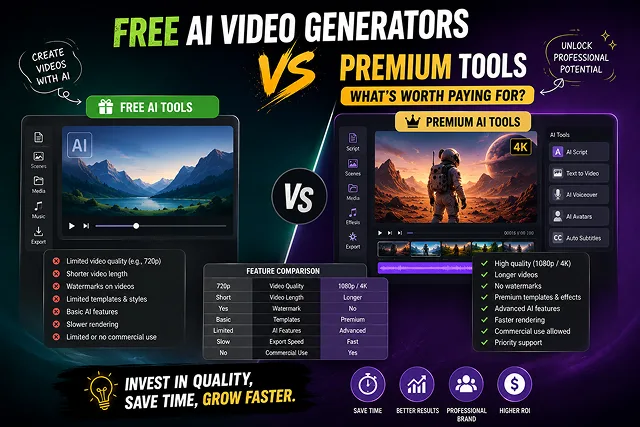
The big difference when deciding between a paid vs. Free video-making AI tool comes down to speed and resolution, commercial rights, and watermarks on the footage.
Free tiers serve as zero-cost environments to test prompt mechanics, camera motion vectors, and storyboards. However, upgrading to a premium subscription becomes essential once your workflow demands commercial usage, high-volume batch processing, uncompressed exports, or visual character consistency.
Above-the-Fold Feature Matrix: Free vs. Premium AI Video Engines
AI Platform Tier Comparison · Free & Open-Source vs. Paid Premium Subscriptions
| Feature / Metric | Free Tiers & Open-Source Tools | Paid / Premium Subscriptions ($10–$100+/mo) |
|---|---|---|
| Watermark Constraints | Visible platform watermarks on exports | Watermark-Free high-definition exports |
| Commercial Licensing | Personal / Educational use only | Full Commercial Rights + Legal Indemnity |
| Render Resolution | Limited (720p SD or low-bitrate 1080p) | Native 1080p Full HD & Ultra HD 4K |
| Processing Priority | Slow public queue (High wait times) | Fast-track rendering & "Unlimited" relaxed queues |
| Max Single-Pass Length | Short clips (3 to 5 seconds max) | Extended clips (10 to 20+ seconds) |
| Advanced Controls | Standard camera presets | Motion Brush, Lip-Sync, Camera Trajectory, & API Access |
1. What Is Actually Worth Paying For?
Subscribing to a premium plan ($12–$95/month) isn't just about removing a watermark—it is an investment in production infrastructure. Here are the four capabilities that justify a paid upgrade:
1. Removing Watermarks & Securing Commercial Rights
- The use of a free-tier video bearing a watermark from a platform on commercial landing pages, client ventures, or social advertisements can hurt the trustworthiness of a brand. Also, cashing in on the free-tier videos with a watermark on platforms such as YouTube or Facebook is against the platform's Terms of Service. Paying for a subscription will allow one to earn clean outputs with a commercial license.
2. Solving "Visual Drift" (Character & Style Locking)
- Free tools generate each video clip independently, meaning a character’s face, hairstyle, or clothing changes drastically from scene to scene. Premium platforms give access to Image-to-Video (I2V) reference anchors, ControlNet spatial locking, and motion vector sliders. This enables creators to keep the exact same character consistent across a 60-second video.
3. Native Spatial Audio & Lip-Syncing
- Advanced models (such as Google Veo or Kling Pro) generate 48kHz synchronized sound effects, ambient Foley, and lip-synced voiceovers directly alongside the visual pass. Free tiers typically output silent clips that require manual audio post-production.
4. Avoiding Processing Speed Limitations
- The cost associated with free AI video rendering is high when based on cloud computing. This is why AI platforms keep free users at slow processing queues. Paying for a subscription gives you faster processing speeds with the possibility of batch-rendering B-rolls in just a few minutes instead of hours.
2. Operational Pipeline : Upgrading from Free to Production
Follow this decision blueprint to determine when your workflow requires upgrading:
Phase 1: Zero-Cost Concept Testing
- Use free daily credit allocations across tools like Runway, Kling, or Pika to test prompt structures, camera motion vectors, and lighting styles. Confirm the visual style meets your standards before spending money.
Step 2: Move to Basic Commercial Tiers
- Select a business package such as the Kling Standard or Runway Standard once you start preparing for promotion. This takes away any watermarks that may be present on the website and provides you with High Definition video exporting functionality along with the right for commercial use of materials.
Phase 3: High-Volume Production via Open-Weights
- If your workflow requires generating hundreds of draft takes per month, transition high-volume B-roll passes to open-source models (like Wan 2.2 or LTX Video) running on local GPUs or low-cost cloud instances (such as RunPod) to eliminate monthly credit limits.
Feature Comparison: Free vs. Paid AI Video Generators
Feature Comparison Matrix · Free Tiers vs. Paid Premium Subscriptions
| Feature Vector | Free AI Video Tiers | Paid / Premium AI Subscriptions |
|---|---|---|
| Output Resolution | 480p — 720p (Draft quality, noticeable compression). | 1080p Full HD to 4K Master Renders. |
| Watermarks | Forced platform logos burned into corner frames. | 100% Watermark-Free Exports. |
| Commercial Rights | Restricted to non-commercial, personal use. | Full Commercial Rights for monetization & client work. |
| Render Queue Speed | Deprioritized queues (15 to 45 min wait times during peak hours). | Priority High-Speed Cloud Rendering (Seconds per pass). |
| Character Consistency | High visual drift (Faces/clothing morph between cuts). | Reference Locks (I2V / IP-Adapter) for character consistency. |
| Generation Length Caps | 3 — 5 second micro-clips. | Extended scenes (10s+) & multi-shot timeline assembly. |
Request A Custom AI Video
Tell us what you're trying to create and we'll point you to the right tool — or help you set it up.
3. Credit Tokenomics : The Hidden Cost Multipliers
Commercial platforms (like Runway Gen-4/4.5 or Kling AI 3.0) rely on dynamic credit consumption. The actual cost per usable video depends on your settings:
- [Standard Mode (Draft 720p)] ➔ ~2 to 5 Credits / Sec ($0.02 – $0.05 / sec)
- [Professional Mode (1080p / 4K)] ➔ ~7 to 12 Credits / Sec ($0.07 – $0.12 / sec)
- [Standard Mode (Draft 720p)] ➔ ~2 to 5 Credits / Sec ($0.02 – $0.05 / sec)
- [Native Spatial Audio Pass] ➔ ~20 to 35 Credits / Sec (5x Multiplier)
1. The 3x "Retry Penalty"
AI video rarely gives a perfect result on the first attempt. 3 to 5 generation passes are typical to render out a clean, glitch-free image:
- Base Price Per Individual 10-Second Render: $0.50 - $1.20
- Real Production Price Per Usable Clip (w/ 3 Retries): $1.50 - $3.60
2. Feature Multipliers
AI video rarely gives a perfect result on the first attempt. 3 to 5 generation passes are typical to render out a clean, glitch-free image:
- Standard vs. Professional Mode: High-fidelity settings like Kling Professional Mode or Runway Gen-4.5 cost 3.5x to 5x more credits per second than standard draft modes.
- Native Audio Synthesis: Models that generate synchronized voices, sound effects, or background audio (such as Kling 2.6/3.0 or Google Veo) use a 5x credit multiplier. Generating a 10-second video with native sound can consume up to 200 credits in a single pass.
4. Subscription Service vs. Open Source Cloud Infrastructure
Various options are available for creators who need to render large amounts of content. Cloud subscription suites have been outlined, as well as options for self-hosted open source solutions (Van 2.2 on RunPod / Vast.ai).
- Option A: Commercial SaaS (Runway / Kling / HeyGen) ➔ $76 – $95/mo ➔ ~1,900 Max Video Seconds
- Option B: Self-hosted GPU (Van 2.2 on RunPod / Vast.ai) ➔ $40 - $50/mo ➔ ~10,000+ video seconds
Option A: commercial, SaaS Subscriptions (The only choice for the non-technical team)
- Price Range: $12 – $95 / month
- Pros: Easy access on the internet, automatically upscaling in the cloud, effortless management of rendering queues, and having ready-to-use tools.
- Cons: Not enough credits each month, queue waiting times with other users during the peak times and inability to get back credits for an unsuccessful rendering process.
Option B: Cloud GPUs Self-Hosted (Most Suitable for It's Technical Creators)
- Price Range: $0.40 to $0.80/hour for Each Item (e.g., NVIDIA RTX 4090 on Vast.ai or RunPod).
- Pros: The ability to work with open-weights models (like Wan 2.2 and LTX Video) on your own machine whether on an infrastructure of cloud GPUs lets you avoid the limit of subscription credits.
- Cons: Requires technical knowledge to set up Python, CUDA drivers, and node-based interfaces like ComfyUI.
Free vs Premium AI Video Tools
Compare rendering queues, watermark policies, resolution caps, credit economies, and commercial licensing rights.
Free AI video tiers operate under strict technical constraints: lower resolution outputs (720p), mandatory branded watermark stamps, slow shared GPU rendering queues, short clip limits (3 to 5 seconds), and non-commercial licensing terms. Premium paid subscriptions remove watermarks, unlock crisp 1080p and 4K master exports, grant priority server access, extend clip durations, and provide full commercial monetization rights.
Generally, no. Most platform Terms of Service specify that free tier exports are restricted to non-commercial, personal experimentation only. Using free-tier clips with platform watermarks for commercial client projects, paid ad campaigns, or monetized YouTube channels violates platform licensing terms. Upgrading to a paid subscription is typically required to secure full commercial copyright clearance.
The four premium features that deliver high return on investment (ROI) include: 1. Priority GPU Queue Access (bypassing multi-hour rendering delays during peak traffic), 2. Unwatermarked 1080p/4K Upscaling, 3. Advanced Director Controls (Motion Brushes, camera trajectory grids, and multi-shot keyframing), and 4. Character LoRA Training / Custom Avatars to maintain long-term visual consistency across projects.
Paid plans operate on a token economy. For example, a $15–$30/month plan might grant 625 to 2,000 monthly credits. A basic 5-second video render typically costs 10 to 20 credits, while high-resolution 4K upscales, video extensions, or native AI audio passes deduct higher credit amounts per generation.
Offered on higher subscription tiers (such as Runway Unlimited), Relaxed Mode allows creators to generate unlimited video clips without consuming fixed monthly credits. In exchange, jobs wait in a secondary queue until cloud GPUs are free. For active creators testing dozens of prompt variations daily, Unlimited Relaxed tiers prevent unexpected credit top-up costs.
SaaS platforms (like Sora or Kling) charge monthly recurring subscription fees for cloud GPU convenience. If you own a desktop PC with a modern graphics card (NVIDIA GPU with 12GB–16GB+ VRAM), running open-source models (like Wan 2.2) locally incurs zero monthly software or credit costs—you only cover basic electricity costs while gaining complete generation freedom and privacy.
Kling AI and Luma Dream Machine lead the cloud platform space by offering daily or monthly recurring credit allowances, enabling users to test motion parameters without immediate payment. Additionally, testing open-source models via public Hugging Face Spaces provides free generation opportunities without credit restrictions.
On most SaaS platforms, subscription credits expire at the end of each monthly billing cycle and do not roll over. However, if you purchase additional standalone credit top-ups, those token add-ons usually remain active as long as your paid account stays open. Always review specific platform rollover terms before buying bulk credit packs.
Keep an eye out for four primary limitations: 1. Maximum Single Clip Durations (cheaper paid tiers may cap single generations at 5 to 10 seconds), 2. Concurrent Generation Limits (only processing 1 or 2 clips at a time), 3. Higher Upscaling Costs (4K exports consuming 3x credits), and 4. Storage Cloud Limits (older raw assets being automatically purged after 30 days).
Follow this simple 3-Step Evaluation Framework: First, test prompt accuracy on free tiers or open-source demos to check physical motion and artifact levels. Second, buy a standard monthly subscription ($15–$30) when ready to publish commercial assets requiring watermark-free 1080p exports. Third, if your output expands to daily social publishing, scale to an Unlimited/Relaxed plan or switch to local open-source GPU setups to maximize cost efficiency.
Ready to try Skora AI?
Transform your ideas into cinematic video in seconds.