
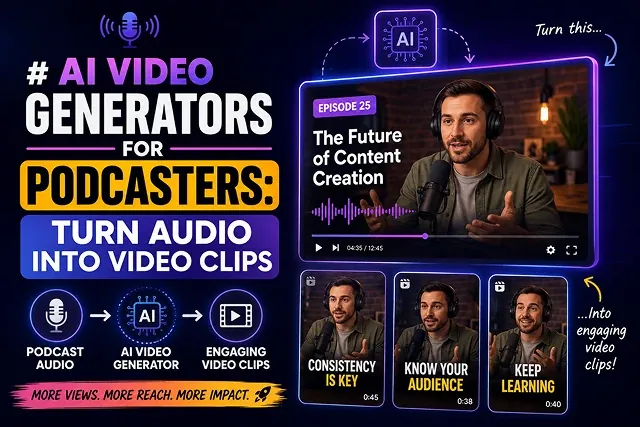
Podcasts in audio form do not get benefits from the significant technology of discovery algorithms available on social media platforms such as YouTube, TikTok, and Instagram Reels. The simplest technique to enhance the popularity of a podcast is through the conversion of audio files in MP3 format into eye-catching short videos that incorporate vivid graphics, captions, animations of sound waves, and footage made by artificial intelligence.
The process of generating an audio-to-video product includes automatic transcription, speaker identification, selection of highlights, and creation of a visual framework in just few minutes without the necessity to operate complex software.
Above-the-Fold Breakdown: AI Podcast Video Generators
Podcast Video Generation Stack · Visual Outputs, Key Strengths & Target Audiences
| AI Tool / Engine | Primary Visual Output | Key Strength | Best Target Audience |
|---|---|---|---|
| OpusClip / Flowjin | Auto-cropped speaker clips & shorts | AI Virality Scoring & active speaker reframing | Video & Audio Podcasters needing rapid shorts |
| Hedra (hedra.me) | Audio-driven 2D/3D talking avatars | Flawless facial lip-syncing from raw audio | Audio-only podcasters who don't record on camera |
| Wan 2.2 Studio | Widescreen generative cinematic B-roll | Physics-accurate, photorealistic background motion | Storytelling, narrative, & true-crime podcasters |
| Podsqueeze / Pictory | Dynamic audiograms & stock footage overlays | Automated highlight extraction & low cost per episode | Solo audio podcasters & social media managers |
| 3D Forge Engine | Text-to-3D interactive assets | Engine-ready 3D prop assets for visual podcasts | Tech, gaming, & pop culture podcasters |
1. Key Features of AI Podcast Clip Generators AI Podcast Clip Generators
The latest audio-to-video solutions move beyond static waveforms, leveraging multimodal AI capabilities:
[Written Text Prompt] ➔ [Language Encoder (uMT5)] ➔ [Spatial-Temporal DiT] ➔ [Single-Pass 4K Master Video]
- Audio-Driven Highlight Detection: NLP scours through full-length audio clips searching for viral moments, intense disputes, or funny one-liners, then automatically cuts them down to 30-second to 1-minute clips.
- Kinetic & Context-Aware Captions: On more than 80% of social media, people view video without sound on. AI tools transcribe speech and animate captions, providing color-highlighting for speech aligned to audio pacing.
- Multi-Speaker Diarization: Identify speakers in the audio and have the AI automatically apply name-tags, split screen or colored borders.
- Generative B-Roll Overlays: Stop your videos from being visually boring when only an audio track is played by having our A. I. Pair spoken content with dynamic royalty-free B-roll images, or video cuts.
2. Step-by-Step Production Sequence
Follow this workflow sequence to convert a long audio episode into viral social clips:
1. Upload Audio & Configure Brand Guidelines
- Upload your rough-cut episode file (. Mp3 or. Wav), or connect your workflow directly from your RSS feed or YouTube video. Ingest your brand settings with color hex codes, logo watermarks, and font selections.
2. Automated AI Analysis & Segment Extraction
- The AI processes the audio file, generates a transcript, and calculates "hook scores" to isolate 3 to 10 high-retention clips. Choose the top segments to implement in your campaign
3. Customize Aspect Ratios & Caption Layouts
- Determine your final framing style. You could go for either a 9:16 vertical aspect ratio for TikTok/Reels/Shorts or a 16:9 ratio for YouTube/Desktop. There's also a possibility to choose a motion type caption format with ensured spatial distance from essential visuals.
4. Render & Export Multi-Platform Assets
- Process the final renders. Download the localized MP4 files alongside generated show notes, chapter timestamps, and social media captions ready for publishing.
Top AI Audio-to-Video Tools for Podcasters
Podcast Repurposing Suite · Primary Focus, Best Use Cases & Standout Features
| AI Platform | Primary Focus | Best For | Standout Feature |
|---|---|---|---|
| OpusClip | AI Clip Extraction & Viral Scoring | Long-form audio/video podcasts | Analyzes transcripts to identify high-engagement hooks. |
| Podsqueeze | Full Repurposing Suite | Audio-only podcasts converting to social media | Auto-generates audiograms, show notes, and chapter clips in one click. |
| Descript | Text-Based Audio & Video Editing | Narrative & interview shows | Edit audio by deleting text from transcripts; generate AI studio sound. |
| HeyGen / Digen AI | Avatar & Speaker Synthesis | Solo hosts without a camera setup | Creates camera-ready digital avatars synced to your voice track. |
| Revid.ai / VEED.io | Template & Kinetic Captioning | Fast TikTok, Shorts, and Reels content | Animated captions, waveform overlays, and social auto-cropping. |
Request A Custom AI Video
Tell us what you're trying to create and we'll point you to the right tool — or help you set it up.
3. Architectural Deep Dive: How AI Processes Podcast Audio into Video
An unprocessed multi-speaker audio file (.mp3 or .wav) has to go through four functioning AI models before it becomes a vertical video production:
[Initial Audio File] ➔ [ASR Speech-to-Text Converter] ➔ [NLP Highlights Selection] ──┐ ├─➔ [Timelines Combining on Different Tracks] [Sound Waves] ➔ [Neural Speaker Diarization] ➔ [Auto-Framing the Video] ──┘
- Auto Speech Recognition (ASR): Transcribes speech into time-coded text, removing noise and um's, like's etc.
- Neural Speaker Diarization: Separates the frequency content, thus allowing the identification of every speaker at every millisecond moment.
- Computer Vision Active-Speaker Tracking: Automatically transforms the landscape video format into portrait (9:16) by means of moving the camera to maintain an active speaker at the center.
- Natural Language Hook Scoring: Determines the topic’s shifts, the pace of speaking, and intensity of vocal message to give clips a “Virality Score”.
4. Post-Production Audio & Visual Assembly Pipeline
Execute this workflow to produce short-form clips from long podcast episodes:
1. Audio Ingestion & Studio Sound Pass
- Upload the unprocessed audio of your podcast episode into a transcript editing software (Descript works). Use AI audio noise removal software (Studio Sound) to clean the echo, noise, and low-frequency murmur of the mic.
2. Automated Cleaning for Filler Words and Silences
- Use automated transcript cleaning methods to wipe out filler words (like "um", "uh", "you know") and take off pauses longer than half a second in order to speed up the flow of your podcast.
3. Multi-Speaking Splitscreen and Active Re-Framing
- ISet target export aspect ratio to 9:16 Vertical. Enable active-speaker tracking: configure the system to display a stacked split-screen layout when both podcast hosts are talking simultaneously.
4. Generative B-Roll & Kinetic Caption Export
- Overlay kinetic animated captions centered on screen. Insert context-aware generative B-roll over long monologue sections, then export at 1080x1920 at 30 FPS.
Podcast Audio-to-Video Engine
Master audio-driven video synthesis, dynamic audiogram creation, speaking avatars, and automated social clipping.
AI platforms run an audio-driven visual synthesis pipeline. The software ingests your MP3/WAV file, uses automated speech-to-text models to build word-level timestamps, detects natural topic shifts, and pairs the dialogue track with animated audio waveforms, contextual B-roll footage, dynamic captions, or lip-synced digital host avatars.
Top specialized tools include: OpusClip and Podsqueeze (best for auto-detecting viral moments and compiling 9:16 social clips with subtitles), HeyGen and Podcastor AI (ideal for generating photorealistic AI hosts that lip-sync to your audio), and Descript and Headliner (premier options for building audiograms, waveform animations, and full-episode video tracks).
An Audiogram is a dynamic video asset that combines a short audio snippet with an animated sound waveform, episode cover art, custom background imagery, and animated text subtitles. Audiograms turn static audio into eye-catching visual posts, allowing podcasters to drive feed engagement on Instagram, LinkedIn, and X without requiring video footage.
AI clipping tools use LLM semantic analysis combined with audio tone markers. The AI scans the transcript to locate strong hooks, humor, controversial statements, or self-contained stories. It assigns a "virality score" to each segment, automatically cropping the top clips into 9:16 vertical videos complete with kinetic captions and sound effects.
Yes. Generative avatar platforms (like HeyGen, D-ID, or Podcastor AI) allow podcasters to select a stock digital host avatar or upload a custom studio photo. The AI analyzes the spoken audio, mapping phonemes to visemes (mouth geometries), generating a video presenter that speaks your podcast audio with natural eye blinks and head movements.
Advanced AI engines use Speaker Diarization to isolate individual vocal frequencies. The system distinguishes Host A from Guest B, automatically switching on-screen graphics, color-coded subtitle bubbles, or active speaker video frames whenever dialogue alternates during multi-person interviews.
Because up to 70% of social media users consume video feeds with audio muted in public settings, kinetic auto-captions ensure your podcast message is understood without sound. Dynamic subtitles highlight spoken words individually with high-contrast colors, holding viewer attention and boosting watch-through rates.
Yes. AI video generators (like InVideo AI or Revid.ai) extract topic keywords directly from your audio transcript. When a host discusses "space exploration" or "market volatility," the system automatically inserts relevant royalty-free stock footage or generative AI scenes over top of the audio track.
Match your canvas dimensions to your target platform: choose 9:16 vertical (1080x1920) for TikTok, YouTube Shorts, and Instagram Reels; choose 16:9 widescreen (1920x1080) for full-length YouTube video podcasts; and select 1:1 square (1080x1080) for LinkedIn and X feed posts.
Follow this 3-Step Podcaster Pipeline: First, upload your finalized audio master file into an AI clipping engine (like OpusClip or Podsqueeze). Second, let the platform auto-detect key highlights, apply animated subtitles, and match visual B-roll or audiograms. Third, perform a quick 2-minute review pass to verify text spelling before exporting multi-format clips ready for publishing across all social feeds.
Ready to try Skora AI?
Transform your ideas into cinematic video in seconds.