
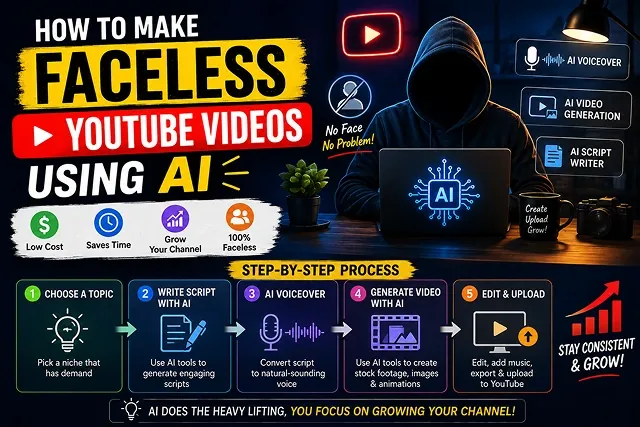
Building a successful faceless YouTube channel in 2026 requires moving past generic stock-footage loops and low-effort prompt-to-video tools. YouTube’s Partner Program strictly enforces originality guidelines, flagging mass-produced or purely automated content as ineligible for monetization.
To build a channel that earns sustainable ad revenue and builds an audience, you need a structured human-in-the-loop AI assembly pipeline.
Above-the-Fold Breakdown: Traditional Faceless vs. AI Automation
Faceless Channel Production · Manual Workflows vs. 2026 AI Pipelines
| Channel Metric | Traditional Manual Faceless Channel | 2026 AI-Powered Faceless Pipeline |
|---|---|---|
| Average Production Time | 6 to 12 Hours per 10-minute video | 20 to 30 Minutes from script to render |
| Voiceover Execution | Paid voice actor or manual mic recording | Zero-shot cloned neural voiceovers |
| B-Roll & Visual Sourcing | Generic, overused stock footage libraries | Custom AI cinematic motion & 3D assets |
| Character Presence | Limited to static graphics or no avatars | Expressive audio-synced AI talking avatars |
| Multi-Language Scaling | $100s per video for foreign translation | Instant automated AI dubbing in 50+ languages |
1. The 2026 Faceless Production Stack
Instead of opting for one-click solutions that could cause your channel to undergo demonetization, consider the idea of using a variety of specialized tools to create your exclusive brand.
ChatGPT / Claude ➔ ElevenLabs Audio ➔ Kling / Sora 2 / Veo 3.1 ➔ CapCut / Premiere (Scripting & Hooks) (Voiceover Generation) (Generative B-Roll) (Editing & Subtitles)
- Writing Scripts and Framing: ChatGPT-4o or Claude 3.5 Sonnet.
- Voiceover for the video: ElevenLabs (benchmark level software for voice imitation and tone regulation).
- Generating Visual B-Roll: Kling 3.0, Google Veo 3.1 or Sora 2 (with InVideo AI or separately).
- Editing & Subtitles: CapCut Desktop or DaVinci Resolve.
2. Step-by-Step Production Pipeline
In order to transform your concept into a publish-ready master file, this assembly line consists of a number of steps:
1. Script Generation & Curiosity Gap Hook
- Prompt your AI writing assistant: "Write a 60-second YouTube Short script about [TOPIC]. Start with an aggressive 3-second curiosity gap hook. Use short, punchy sentences, and include a pattern interrupt at 30 seconds." Review and edit the script manually to add unique factual angles.
2. Voiceover Synthesis & Pacing Optimization
- Paste the edited script into ElevenLabs. Choose a conversational authoritative voice profile. Change the stability level between 40 and 50 percent in order to keep the natural pitch variations of the voice. After this you should export the file and speed up the playback rate slightly at an editor to eliminate the dead scenes.
3. Generative B-Roll & Visual Cut Drops
- Use Kling 3.0 or Veo 3.1 to produce 3-5 seconds long video clips which will match with each voice event. Use similar style anchors on your prompts in order to keep the visual story consistent.
4. Timeline Assembly & Kinetic Captions
- Make the video and audio imports into CapCut. Change the visual cuts on every 1.5 to 2.5 seconds in order to keep the consistency in attention of the audience. Use the bold and much contrasting auto-captions being positioned in the center third of the frame.
5. Audio Ducks, Transition SFX, and Export
- Light SFX for scene transition(whooshes/pops). Background track to be on -18/-20 db range under narration. Export at 1080x1920 (9:16) at 30 FPS for Shorts, or 1920x1080 (16:9) for long form.
1. High-Performing Faceless Niches in 2026
Niche Selection Matrix · Audience Retention & Monetization Potential
| Niche Category | Content Angle & Visual Style | Monetization Potential |
|---|---|---|
| Finance & Economics | Compound interest, market breakdowns, wealth strategies (Clean 3D graphics). | Very High CPM ($15–$35) + Affiliate Links. |
| True Crime & Mystery | Historical cold cases, unexplained phenomena (Cinematic dark AI B-roll). | High Watch Time & High Sponsorship Rates. |
| Tech & AI Explainers | Software tutorials, future tech, hardware breakdowns (UI screen recordings + AI visuals). | High CPM ($10–$25) + SaaS Affiliates. |
| Micro-Documentaries | Deep dives into historical events, business empires, or science (2D/3D historical renders). | High Retention & High Ad Revenue. |
Request A Custom AI Video
Tell us what you're trying to create and we'll point you to the right tool — or help you set it up.
3. Quantitative Cost & Originality Compliance
To pass YouTube Partner Program manual reviews and prevent demonetization under the Reused / Repetitive Content Policy:
- Avoid Unedited Stock Loops: Do not match raw text to generic, unedited stock video libraries without custom editing or commentary.
- Human Editorial Direction: Always review and refine AI-generated scripts. Inject original analysis, personal opinions, or verified primary data.
- Custom Packaging: Create unique thumbnails using programs like Canva or Photoshop instead of relying on auto-generated video thumbnails.
- Audio Ducking and Sound Effects: Multi-track audio editing (ducking music in the background of speech and adding sound effects during transitions) conveys a human touch in editing.
4. Advanced Multi-Prompt Visual Scene Engineering
To maintain visual integrity and ensure uniformity in the entire video, you will need to write all your prompts with the following Global Style Anchor:
- [Universal Style Base]: Anamorphic 35mm glass, gloomy chiaroscuro lighting, frame rate of 24 FPS, real film grain, shades of slate grey and amber.
- [SCENE 1 (SOUND/VIDEO: 0-4 seconds)]: [Universal Style Base] + 24mm wide shot of an empty rainy street in Chicago at night, where all neon signs are seen on the wet asphalt road. Slow dolly pushing in along the Z-axis.
- [Scene 2 (4-8s)]: [Global Style Anchor] + Medium close-up shot of a detective looking over a manila case file inside a dimly lit diner, soft warm key light from camera-left.
5. High-Retention Multi-Track Audio Architecture
A dry voiceover over flat background music causes audience retention to plummet. Structure your editing software timeline using a 3-Pass Audio Stack:
[Voice Track] ───────➔ EQ Boost (2kHz - 5kHz) + Compressor ➔ Vocal Clarity │ ▼ [Music Track] ───────➔ Sidechain Ducking (-18dB Drop when Speech is Active) │ ▼ [Audio Effects] ─────➔ Link Whooshes/Pops to Each Scene Change (Micro-Dopamine Stimuli)
- Vocal Isolation & Equalization: Isolate and Eq Your Voice Process your A. I. Voiceover (such as with ElevenLabs) through a parametric EQ. High-pass your EQ at 80Hz to eliminate lower room rumble, and boost 2kHz - 5kHz for that punchy narration to rise above phone speaker distortion.
- Sidechaining: Background music must be pre-configured so that it automatically drops by -16 to -20 dB when the speech plays, thus allowing it to rise in volume in between speech segments.
- Transition sound effects: You have to use some light sound effects (like whooshes, risers, page flips or bass drops) in all visual transitions.
Faceless AI YouTube Guide
Master channel monetization, automated scriptwriting, voice synthesis, and visual B-roll production.
A faceless YouTube video delivers educational or entertaining content without showing the creator's face on camera. AI streamlines this process by using Large Language Models (like ChatGPT) to write high-retention scripts, Neural Text-to-Speech tools (like ElevenLabs) to generate natural narration, and AI video generators or stock libraries to supply matching visual B-roll footage automatically.
Yes, provided the content complies with YouTube's Reused and Repetitive Content policies. YouTube rejects channels that upload low-effort, robotic audio slides with minimal commentary. To pass monetization review, ensure your videos feature human-like expressiveness in the narration, dynamic editing, original script writing, kinetic text captions, and distinct editorial value.
The top-performing niches focus on storytelling and educational content where visual B-roll fits naturally. Leading choices include Personal Finance & Wealth Management (highest ad rates/CPM), Historical Documentaries & True Crime (strong viral retention), Tech News & AI Explainers, and Self-Improvement / Philosophy.
A typical workflow combines four core software layers: 1. Scripting (ChatGPT or Claude), 2. Voiceovers (ElevenLabs or Fish Audio), 3. Visual Sourcing (Midjourney, Kling AI, or free stock sites like Pexels), and 4. Timeline Assembly (CapCut, InVideo AI, or Premiere Pro) to stitch audio, visuals, and animated captions together.
Instruct your text LLM to output scripts in a 2-Column Storyboard format (Column 1: Spoken Voiceover Narration | Column 2: Specific Visual B-Roll Prompt). Prompt the model to open with a powerful 3-second hook that creates a curiosity gap, followed by short, active-voice sentences that are easy for AI voice generators to speak clearly.
Avoid flat, default settings. In voice generation suites like ElevenLabs, set your vocal stability slider to roughly 50-60% to allow natural pitch variation. Format your script with natural punctuation (such as dashes, commas, and ellipses) to introduce conversational pauses, or use emotion tags (like *excited* or *thoughtful*) to vary the delivery.
Combine royalty-free stock platforms (like Pexels or Pixabay) with custom AI video generators (such as Kling AI or Wan 2.2). Using AI generators allows you to create specific, cinematic shots tailored precisely to your script lines, ensuring your channel features unique visuals that haven't been used by other creators.
Faceless retention depends on pacing and visual variety. Change your on-screen visual element every 2 to 4 seconds. Incorporate word-by-word animated captions, subtle zoom-in/zoom-out effects on static images, fitting background music, and relevant sound effects (like subtle pops or swooshes) when key points appear on screen.
Yes. YouTube mandates that creators toggle the "Altered or Synthetic Content" flag active in YouTube Studio if the video includes realistic synthetically generated visuals or cloned human voices. Marking your content correctly ensures transparency and protects your account from guideline flags or monetization suspensions.
Follow this efficient 3-Step Weekly Batch Routine: First, write 3 to 5 video scripts using your LLM prompts and generate all voiceover audio files at once. Second, gather and generate all matching B-roll footage and image assets in bulk. Third, assemble the clips inside an editor (like CapCut), add auto-captions and background tracks, and schedule your video uploads across the week.
Ready to try Skora AI?
Transform your ideas into cinematic video in seconds.