
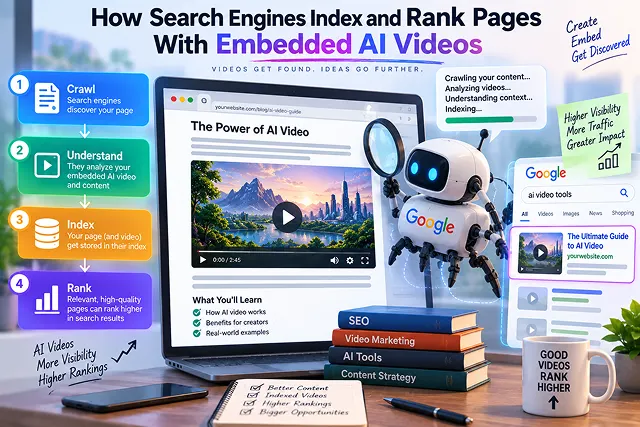
Search engines are incapable of cataloging or evaluating videos in regard to visuals. When Googlebot or Bingbot scans a website that has embedded an AI video, they are not able to determine if an avatar looks real or if fluid simulation is realistic. Instead, search engines analyze DOM container structures, metatext, keywords density, video prominence and streaming transcript.
It is essential for publishers using AI videos to have a solid understanding of the indexing process to steer clear of getting red flags from Google Search Console like, “Video is not the main content of the page” or “Cannot determine video location and size” while following practices for good positioning in search rankings and adhering to AdSense compliance.
Above-the-Fold Breakdown: Traditional Video SEO vs. Modern AI Video Indexing
Video Indexing Matrix · Legacy Video SEO (Pre-Recorded Files) vs. Modern AI Video Indexing Pipeline
| Technical Dimension | Legacy Video SEO (Pre-Recorded Files) | Modern AI Video Indexing Pipeline |
|---|---|---|
| Indexing Eligibility | Video could be anywhere on the page (Footer/Sidebar) | Requires Prominence Rule (Must be in initial render viewport) |
| Content Verification | Relied purely on manual transcription & tags | Automated Computer Vision & ASR (Speech-to-text checks) |
| Search Schema | Basic title and description properties | VideoObject JSON-LD with Key Moments & hasPart clips |
| Core Web Vitals Impact | Heavy MP4 files caused slow Largest Contentful Paint (LCP) | Facade players & modern codec streaming (AV1 / HLS) |
| GSC Error Risk | Infrequent indexing errors | High risk of "Google could not determine prominent video" |
| Rich Snippet Potential | Standard video thumbnail link | Direct AI Overview citations, Seek-to-Action, & Video Carousel |
1. How Search Crawlers Process Embedded Video
Search engine crawlers evaluate an embedded video page across four distinct verification layers:
[Googlebot Web Fetch]
          │
          ▼
[Layer 1: Host Page Indexability] ➔ URL response 200 OK, noindex absent, clean canonical
          │
          ▼
[Layer 2: Rendered DOM & Prominence Evaluation]
    ├── Video container width: 140px–1080px (at least 1/3 of viewport width)
    ├── Located above the fold (within primary renderable area)
    └── Embedded using standard HTML elements (<video>, <embed>, <iframe>)
          │
          ▼
[Layer 3: Metadata & Audio Transcript Parsing]
    ├── VideoObject JSON-LD Schema (name, description, uploadDate, contentUrl)
    ├── Time-stamped WebVTT closed captions (<track kind="captions">)
    └── Surrounding semantic HTML (<article>, headings, ingredient/step lists)
          │
          ▼
[Layer 4: Video Fetch & Thumbnail Indexing] ➔ Googlebot-Video requests media bytes (.mp4/.m3u8)
1. The "Main Content" Rule
Google has a stringent guideline regarding the video rich snippets, whereby the video is the main element of the page content.
- Watch Page/Video Mode: If a page is made for video tutorial contents, then the player box should be placed at the top and be easily visible on the screen.
- Supplementary Video Mode: If a video is added to a 2,000 word article as secondary content, then although Google indexes the texts of the article, the video won’t have a separate video rich snippet in searches.
2. The DOM Container Requirement
- Googlebot must detect standard HTML embed elements (video, iframe, or object) directly in the rendered DOM. If a site hides the video container behind complex JavaScript clicks without providing fallbacks, or sets the container size below 140×140 pixels, the crawler marks the video as unrenderable or secondary.
2. How Search Engine Bots Process Embedded AI Videos
Search engines are incapable of “watching” video in the same manner as people do. They execute a multi-tier pipeline involving initial HTML parsing, JavaScript rendering, and neural understanding:
[ Googlebot Discovers Host Page URL ]
                  │
                  ▼
┌───────────────────────────────────┐
│   1. HTML Parsing & Schema Scan   │ (Checks VideoObject JSON-LD, title, thumbnail)
└─────────────────┬─────────────────┘
                  │
                  ▼
┌───────────────────────────────────┐
│    2. Chromium Rendering Pass     │ (Evaluates viewport position, width > 140px, LCP)
└─────────────────┬─────────────────┘
                  │
                  ▼
┌───────────────────────────────────┐
│   3. Automated Video Crawl & ASR  │ (Verifies speech matches page copy & provenance)
└─────────────────┬─────────────────┘
                  │
                  ▼
[ Evaluated for Video Mode Indexing or Main Search Rich Snippet ]
- HTML & Structured Data Parsing: Crawlers first check your raw DOM for metadata—specifically a valid VideoObject schema script detailing the video title, description, thumbnail URL, and upload date.
- Headless Chromium Rendering (The Prominence Test): Googlebot executes your page's CSS and JavaScript using headless Chromium. It calculates the exact bounding box of your video player. If the video is buried below 3,000 words of text, smaller than 140 pixels wide, or hidden in an accordion, it is rejected for "Video Mode" indexing.
- Automated Speech Recognition (ASR) & Semantic Verification: If Google chooses to fetch the media file, its algorithms extract spoken audio and screen frames. If your AI video discusses topics completely unrelated to the host page's text, the page loses semantic alignment and is penalized for misleading content.
Technical Factors That Determine Video Page Rankings
Once Google confirms the video meets baseline indexing criteria, multi-variable ranking systems (including RankBrain, MUM, and helpful content algorithms) evaluate the page:
| Ranking Vector | Crawler Evaluation Mechanism | Optimization Rule for AI Video Pages |
|---|---|---|
| Acoustic / Speech Text | Crawlers parse WebVTT caption tracks and audio streams via speech-to-text models. | Supply explicit <track kind="captions" src="subtitles.vtt"> files containing accurate timecodes. |
| Structured Schema Data | JSON-LD schema parsing validates entity relationships and media durations. | Implement comprehensive VideoObject and HowTo schema with valid timestamps. |
| Contextual Text Density | NLP evaluates semantic correlation between surrounding copy and spoken video topics. | Enforce the 70/30 Contextual Text Rule—pair videos with in-depth written explanations. |
| Core Web Vitals & Hydration | Headless Chrome measures Largest Contentful Paint (LCP) and Cumulative Layout Shift (CLS). | Use interactive click facades with explicit CSS aspect ratios to avoid layout shifts. |
| User Interaction Signals | Search tracks bounce rates, dwell time, and video completion rates. | Match video titles strictly to search intent; hook viewers within the first 5 seconds. |
Request A Custom AI Video
Tell us what you're trying to create and we'll point you to the right tool — or help you set it up.
3. The Concept of Prioritizing Video as the Primary Content Explored
- The end of 2023 marked a turning point for Google in its video indexing process: Under the new rules, videos can only show their face in the Google Search "Video" section if they are the main content of the page.
- When the Video is the Main Content: An example of such a case is a page of video guide or demo, where the video can be found above the fold, it occupies more than 33% of the screen width, acting only as a summary for the video content. Google allows such content to be indexed under the Google Video page.
- When the Video Acts as Supplementary Content: Example of this case would be a 2500-word content, which has the AI explainer video embedded at some point of the page to explain some of the subtopics. Although the video does not get listed in the video pages section of the search results, the page may potentially get a video rich thumbnail, provided that schema and Core Web Vitals work well.
4. The 5-Step Step-by-Step Technical Setup for Video Indexing
Follow this production workflow to ensure search engines crawl, render, and index your embedded AI videos seamlessly:
1. Generate Broadcast-Grade AI Video Assets
- Produce high-retention video content using purpose-built browser engines:
2. Position the Video Player for Search Prominence
- Place your video player above the fold or in the first visible viewport:
3. Implement Complete VideoObject Schema
- Inject a valid JSON-LD schema block into the page header or directly preceding the embed. Provide exact properties including name, description, thumbnailUrl, uploadDate, and contentUrl.
4. Include On-Page Transcripts & Kinetic Captions
- Search crawlers are text-first indexers. Always provide a written transcript or timestamped summary directly underneath the embedded video. Ensure the video itself features dynamic kinetic subtitles for mobile users viewing on mute.
5. Sending Video Sitemap and Inspect it on Google Search Console
- Add video URL to the Video XML Sitemap and submit to Google Search Console. Use the URL Inspection Tool and click on “Test Live URL” → “View Tested Page” → “Screenshot” in order to verify that Googlebot has detected the video player in its entire size.
5. 4 Common Indexing Mistakes to Be Aware Of
- Refrain From Using Significant Thumbs That Are Not Permanent: Numerous cloud hosting CDNs provide temporary URLs that are signed and that expire after a day or less. Googlebot will keep caching thumbnails for weeks; if the URL responds with a 403/404 error, your video snippet will be removed swiftly. Always host your static WebP/JPEG thumbnails on your root domain.
- Do Not Place Multiple Unrelated Videos on One Page: If your article embeds three different AI video clips, Google will typically only evaluate the first prominent player. Placing multiple videos confuses the algorithms determining the prominence of the content; one main video should be concentrated on at a time instead.
- Never Deny Crawlers Access through Robots.txt: Make sure that your video Content Delivery Network (CDN), thumbnail assets folder, and player scripts are not mentioned in the robots.txt document. If Googlebot is unable to download the thumbnail file, it cannot make a search snippet.
- Avoid Single Page App / Pure Client-Side Hydration for Schema: Your React/Vue/Next.js SPA loads Video Object schema through difficult late-firing JS hooks, crawlers will often see a blank dom on first pass. Render structured data in the server (SSR) or static (SSG).
AI Video SEO & Indexing Mechanics
Master Schema.org VideoObject markup, Googlebot crawling, video sitemaps, transcripts, and video rich snippet rankings.
Search engine bots (such as Googlebot) do not natively "watch" video frames during initial crawl passes. Instead, they discover videos by analyzing HTML5 <video> tags, iframe embed sources, structured data markup (JSON-LD), and XML Video Sitemaps. To index the video, crawlers must find a supported video file URL or player URL along with a crawlable thumbnail image and descriptive text context.
To earn a video thumbnail rich snippet in the main Search Engine Results Page (SERP), the video must be the primary focus of the page. If an AI video is buried below 3,000 words of blog text or placed in a sidebar as supplementary media, Google will not display a video snippet in main search results, though the page may still qualify for dedicated Google Videos tab search rankings.
To pass Google rich result validation, your JSON-LD VideoObject schema must include: name (title), description, thumbnailUrl (high-res crawlable image), uploadDate (ISO 8601 format), and at least one media link: contentUrl (direct .mp4 file) or embedUrl (the player iframe link). Adding duration and transcript properties further elevates topical authority.
Search engines use automated speech recognition and natural language processing to understand video dialogue, but crawler access to audio streams can be inconsistent. Supplying a clean text transcript on the host page or linking an SRT/VTT caption track gives crawlers indexed textual tokens, helping the page rank for long-tail search queries mentioned in the AI narration.
Embedding from platforms like YouTube often leads Google to prioritize the YouTube watch page in video search rather than your own domain. If your primary goal is ranking your custom domain in SERPs, use specialized B2B video platforms (like Wistia or Cloudflare Stream) or self-host your MP4 on an optimized CDN with dedicated Schema.org markup pointing back to your URL.
Google SERPs can display interactive timestamps (Key Moments) directly under a video result. For embedded videos on your own site, you can enable this using SeekToAction schema or Clip structured markup inside your VideoObject. This informs Google where chapters start and end, allowing users to jump directly to specific topical segments from search results.
Google's official stance is that the production method (AI or human) does not inherently penalize a page. Search algorithms judge content based on its utility, accuracy, user satisfaction, and alignment with E-E-A-T (Experience, Expertise, Authoritativeness, and Trustworthiness). Low-quality, repetitive "AI video slop" will struggle to rank, while high-value, structured explainers can perform strongly.
Heavy embedded video players and uncompressed video masters can damage your Largest Contentful Paint (LCP) and Cumulative Layout Shift (CLS) scores. To prevent ranking drops, use a lightweight facade (a static thumbnail that loads the interactive player only on click), define explicit aspect ratios via CSS to eliminate layout shift, and preload only metadata rather than the full video stream.
An XML Video Sitemap functions as a direct index roadmap for web crawlers. Instead of waiting for Googlebot to execute complex JavaScript embeds to uncover a video player, the sitemap explicitly provides the host landing page, direct content URL, video thumbnail path, publication date, and rating, cutting the time required for a new video page to be indexed from weeks to days.
Follow this proven 3-Step Video SEO Blueprint: First, place your embedded video above the fold as the primary focal element, accompanied by a clear H1 title and supporting text summary. Second, implement comprehensive JSON-LD VideoObject schema including a high-contrast thumbnail URL, direct media link, and full transcript. Third, submit your updated XML Video Sitemap to Google Search Console and inspect the URL using the Rich Results Test tool to verify schema validity.
Ready to try Skora AI?
Transform your ideas into cinematic video in seconds.