
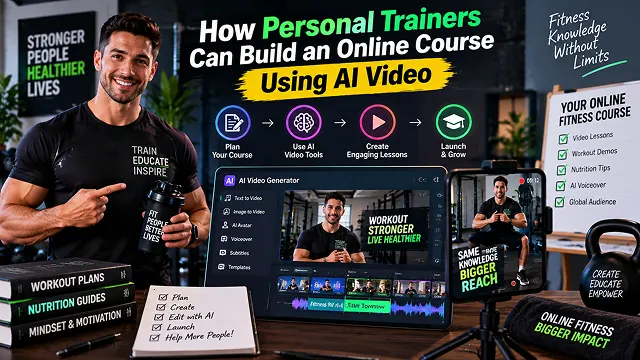
Personal fitness trainers and strength coaches often face an income ceiling dictated by billable hours: trading time for one-on-one sessions leaves little room for scaling revenue. While transitioning into digital fitness products—such as structured 12-week hypertrophy programs, mobility routines, or fat-loss courses—is the industry standard for scaling, traditional course production is notoriously demanding.
Looking for commercial gym space, hiring a film crew, and recording hundreds of videos of exercises from multiple angles can run up a bill of tens of thousands of dollars, not to mention weeks of hard work.
With automatic AI video production systems, an individual fitness professional can write scripts, record their voice, and create animation and production of the final world-class video course right from her notebook. By using computer avatars, neural text-to-speech, and 3D biomechanics diagrams in the course of production of the video, exercise science becomes clear and easy to grasp.
Above-the-Fold Feature Matrix: Traditional Fitness Filming vs. AI Video Course Stack
Fitness Production Comparison · Traditional Gym Shoots vs. AI-Powered Fitness Video Pipelines
| Production Dimension | Traditional Gym Video Shoot | AI-Powered Fitness Video Pipeline |
|---|---|---|
| Production Timeline | 3 to 6 Weeks (Gym rental, filming, manual cuts) | 2 to 4 Days (Modular batch generation) |
| Equipment & Facility Costs | $2,500 – $10,000+ (Gym permits, lighting, camera crew) | $0 – $40/mo (Web browser platforms & open tools) |
| Coach Burnout & Physical Fatigue | Filming 50+ reps per exercise across multiple takes | Zero physical fatigue (AI renders exercise form) |
| Audio Quality & Coaching Cues | Gym echo, background clanking, mic friction | Studio-grade cloned coaching voiceover |
| Updates & Exercise Swaps | Must re-rent space and re-film from scratch | Re-prompt scene or edit script in minutes |
| Global Localization | Limited to the coach's spoken language | Instant dubbing & lip-syncing in 50+ languages |
1. The AI Fitness Course Production Architecture
A high-converting online fitness academy is more than just a series of talking-head clips; it requires clear instruction showing proper form, common errors, tempo counting, and muscle engagement cues.
[Curriculum Outline & Biomechanics Prompts (LLM)]
                       │
                       ▼
    [Modular Lesson Script with SSML Tempo Timing]
                       │
         ┌─────────────┴─────────────┐
         ▼                           ▼
[Trainer Digital Avatar]    [3D Biomechanical & Form Assets]
(HeyGen / Synthesia / Tavus)(Kling 3.0 / ComfyUI / ControlNet)
         │                           │
         └─────────────┬─────────────┘
                       ▼
[Programmatic Compositor: Remotion / FFmpeg Node]
  • Left Viewport: Trainer explaining form & cues
  • Right Viewport: Kinetic exercise execution with joint angles
  • Lower Overlay: Rest timers, set/rep ranges, tempo counters (3-0-1-0)
                       │
                       ▼
[Automated LMS Ingestion: Teachable / Kajabi / Skool API]
1. The Trainer's Digital Likeness (Avatar Cloning)
- Personal trainers can record a one-time, 2-minute 4K calibration video to generate an interactive digital twin (via HeyGen, Tavus, or Synthesia). This clone speaks every module's introduction, physiological rationale, and programming instructions with identical tone and cadence, eliminating fatigue from filming dozens of verbal takes.
2. Demonstration of Form and Joint Angle Monitoring
- In complex combined motions (such as the Barbell Romanian Deadlift or Overhead Press), generative image-to-video systems (such as Kling 3.0, Runway Gen-4) that are subjected to 3D skeleton poses (through ControlNet OpenPose) demonstrate the ideal biomechanics of these movements without distortion from the camera or uncomfortable filming angles.
3. Integrated Muscle Engagement Overlays
- Viewers grasp exercise cues faster when they visually see target muscle recruitment. Programmatic split-screen layers highlight the agonist (primary mover) in high-contrast cyan and synergists (stabilizing muscles) in amber as the avatar delivers verbal form cues.
2. Procedure of development for the curriculum step by step
1. Form the curriculum for the 12-week course program in detail
- Utilize an LLM (Claude 3.7 or GPT-4) utilizing a prompt of exercise science persona to produce a detailed instruction for the course over 12 weeks. Split the process into phases: phase 1 (quality of movement & neuromuscular changes), phase 2 (hypertrophy & the ability to work), phase 3 (maximum strength & deloading).
2. Clone Trainer Likeness and Vocal Signature
- Capture your calibration headshot video and studio audio sample so you can teach your digital avatar. Check the pronunciation of technical anatomical terms like latissimus dorsi, acetabulofemoral joint and valgus collapse.
3. Batch-Generate Form Demos and Keyframe Cards
- Create PowerPoint style 16:9 exercise demo videos that are identical to each other with Image-to-Video models. Display next to each demo example a Form Dos and Don'ts card with joint angles, bar paths and spinal positions.
4. Automate Compositing with Split-Screen Layouts
- Pass the avatar narration, form demonstration clips, and lower-third data overlays (RPE scales, rep counters, rest intervals) into an automated Remotion or FFmpeg video compositing pipeline.
5. Batch-Export and Upload to LMS Portal
- Export completed lessons in 1080p Full HD resolution. Upload the video series to any contemporary course platform (Teachable, Kajabi, Skool etc). Also include PDF copies of the workout logs and trackers to promote progressive overload.
Traditional Fitness Course Production vs. AI Video Workflows
Fitness Production Matrix · Traditional Gym Filming vs. Automated AI Course Pipeline
| Production Vector | Traditional Video Course Filming | Automated AI Fitness Course Pipeline |
|---|---|---|
| Gym & Studio Booking | Requires booking off-peak commercial gym hours ($50–$150/hr). | Zero venue costs (Virtual gym environments & green-screen compositing). |
| Production Crew | Requires videographer, audio tech, and lighting setup. | Solo operator using generative video and automated camera motion. |
| Time to Produce (30 Lessons) | 4 to 8 weeks (Filming, editing, retakes, audio cleanup). | 3 to 5 days end-to-end using modular pipeline templates. |
| Updating Exercise Science | Requires re-renting the gym and filming new physical takes. | Text-prompt update (Edit the script and re-render the module in minutes). |
| Anatomical Visualization | Verbal explanation only, or expensive 3D VFX post-production. | Integrated 3D muscle group highlight overlays layered programmatically. |
| Localization & Subtitles | Expensive voice actors and manual transcription services. | Zero-shot neural voice cloning with native translation into 20+ languages. |
Request A Custom AI Video
Tell us what you're trying to create and we'll point you to the right tool — or help you set it up.
3. The 3 Core Video Types in a Digital Fitness Course
A good online fitness program needs more than just a few exercise videos. If you want to achieve high client retention and completion rates, divide your course into three different video categories.
┌────────────────────────────────────────────────────────┐
│         The 3 Essential Fitness Course Formats         │
└───────────────────────────┬────────────────────────────┘
                            │
        ┌───────────────────┼───────────────────┐
        ▼                   ▼                   ▼
┌───────────────┐   ┌───────────────┐   ┌───────────────┐
│1. Exercise Form│   │ 2. Mindset &  │   │ 3. 3D Anatomy │
│  Breakdowns   │   │ Module Intros │   │   & Muscle    │
│(30-60s tactical│  │(Talking Coach │   │  Engagement   │
│ movement cues)│   │   Avatars)    │   │  Visualizers  │
└───────────────┘   └───────────────┘   └───────────────┘
- Exercise Form Breakdowns (30-60 seconds): Videos that show how to do an exercise, including how the exercise is performed, helped with breathing and spotting common mistakes made when exercising.
- Module Orientation & Mindset Talks (1-2 minutes): Presentation of the trainer introducing weekly training schedules and ERG.
- Anatomical & Equipment Walkthrough: A video showing how to get the best results from muscles, joints, and equipment.
4. Step-by-Step Pipeline to Create an AI Fitness Course
Complete the five-step procedure below to create your own online fitness school:
1. Outline the Course and the Two-Track Scripts
- The first step to effectively organize your training program is to break it down into different phases such as Foundation or Hypertrophy. For every phase there must be made two scripts with audio and video cues.
2. Synthesize Vocal Tracks via Voice Cloning
- Instead of generic synthesized voices, clone your own natural coaching voice using Instant Voice Cloning. This allows you to generate hundreds of exercise instructions and mindset talks using your authentic vocal inflection and motivational style.
3. Generate Visual Demonstrations & Coach Avatars
- Match your script modules to dedicated browser engines:
4. Add Kinetic Captions & Form Check Callouts
- Edit your video footage once you’ve got your exercise demonstrations in place. The aim of editing is to add summary words so that while exercising, clients could listen to you while reading the active captions.
5. Upscale to 4K & Organize on Course Platforms
- Next, pass your edited videos through an AI-enhancer to remove any imperfections in the video and produce a good copy of the video file. Export the final material in a proper format and upload the program.
5. Safety & Compliance Rules for AI Fitness Courses
- Mandatory Physical Activity Readiness Disclaimers: Fitness instruction carries inherent physical risk. Always include an on-screen disclaimer and intro module statement: "Consult with a physician before starting any exercise regimen. Form cues provided are educational guidelines."
- Put Importance on Biomechanical Mechanics Rather Than Excessive Weights: When illustrating pictures of working out, emphasize the importance of proper rhythm, fluidity of movement, and the position of the spine over any images portraying excessive amounts of weight.
- Provide Clear Exercise Regressions: For each important compound lift tutorial there should be a visual regression or a similar exercise (for instance, an alternative for Goblet Squats may be provided for clients with limited shoulder mobility).
- Keep Audio and Music Separated: Keep the volume of the background music at around -16 to -18 dB. This is very important to be able to hear the instructions given about the movement and breathing.
AI Video for Fitness Coaches
Scale your training business, automate exercise curriculum production, and build recurring online revenue.
Personal trainers use generative video tools to replace manual production with Digital Trainer Avatars, Anatomical 3D Visualizations, and Automated Slide Presentations. By pairing an AI-cloned talking-head presenter with animated exercise demonstrations, on-screen rep/set counters, and kinetic bullet-point summaries, coaches can generate full multi-week training courses directly from structured text programs.
A streamlined fitness course stack includes: ChatGPT or Claude (for structuring workout periodization and drafting lesson scripts), HeyGen or Synthesia (for generating the coach’s digital twin to introduce modules), ElevenLabs (for high-energy motivational voiceovers), and CapCut (for adding exercise timers, rest-interval graphics, and auto-captions).
By recording a single 2-minute baseline video speaking in athletic wear, a coach can generate a Custom Instant AI Avatar. Whenever the course curriculum updates—such as adding a new module on macro-tracking or sleep optimization—the trainer simply inputs the new script, and their digital clone renders the lesson with natural facial expressions and authentic vocal cadence.
Instead of purchasing costly medical 3D licenses, trainers can use Image-to-Video prompts (via Kling or Runway) to generate Kinetic Anatomical Cutaways (e.g., "3D render of human muscular anatomy performing a barbell deadlift, highlighting glutes and hamstrings in glowing red fiber activation"). Overlaying these animations over exercise tutorials provides clients with high-end biomechanical feedback.
Use a Micro-Learning Architecture (3 to 5 minutes per lesson):
• Lesson Hook (30s): AI coach explains the movement's athletic benefit and target muscle groups.
• Form Breakdown (90s): Side-by-side video showing ideal form versus common injury-causing mistakes.
• Prescription & Tempo (60s): Reps, sets, rest parameters, and tempo callouts visually pinned on screen.
• Action Check (30s): A clear challenge or homework task for the client's training log.
By adopting a Batch-Prompting and Template Workflow. Trainers can write standardized 45-second instructional scripts for 100 movements using ChatGPT. Using batch generation pipelines in HeyGen or ElevenLabs, the coach can render all 100 audio/avatar voiceovers simultaneously, splicing them over existing movement footage or AI b-roll without ever resetting studio lighting or filming on gym equipment.
Using cross-lingual lip-sync platforms (such as HeyGen Video Translate or ElevenLabs Dubbing), trainers can take their finished English master course and translate it into Spanish, Portuguese, German, or Japanese with natural lip matching. This allows boutique coaches to unlock massive global markets without hiring multilingual translators or re-filming demonstrations.
By linking coaching CRMs (like Trainerize or TrueCoach) with generative video APIs (like Tavus or HeyGen) via Zapier. When a client submits their weekly weigh-in and workout logs, the system automatically triggers a personalized video where the coach’s avatar addresses the client by name, mentions their logged weight loss, and congratulates them on completing their weekly workout targets.
Online fitness programs carry physical injury liabilities. Every video module should include a standard medical disclaimer banner (e.g., "Consult a physician before starting any exercise program"). Furthermore, if avatar presenters or synthetic voiceovers are used, toggle platform synthetic media disclosures and ensure all movement tips reflect certified training standards (such as NASM, ACSM, or CSCS).
Follow this proven 3-Step Fitness Academy Blueprint: First, outline a targeted 4-week program (e.g., "Kettlebell Foundations for Beginners") and generate concise lesson scripts using an LLM. Second, render module introductions using your cloned AI coach avatar in HeyGen and generate 3D biomechanical overlays. Third, edit in CapCut with rep/set graphics, burn in kinetic subtitles, upload the finished curriculum to Skool or Teachable, and launch your automated membership funnel.
Ready to try Skora AI?
Transform your ideas into cinematic video in seconds.